
Autostereogram-Maker1.63 - App Store
You'll be able to see results in few seconds.
Publisher Description


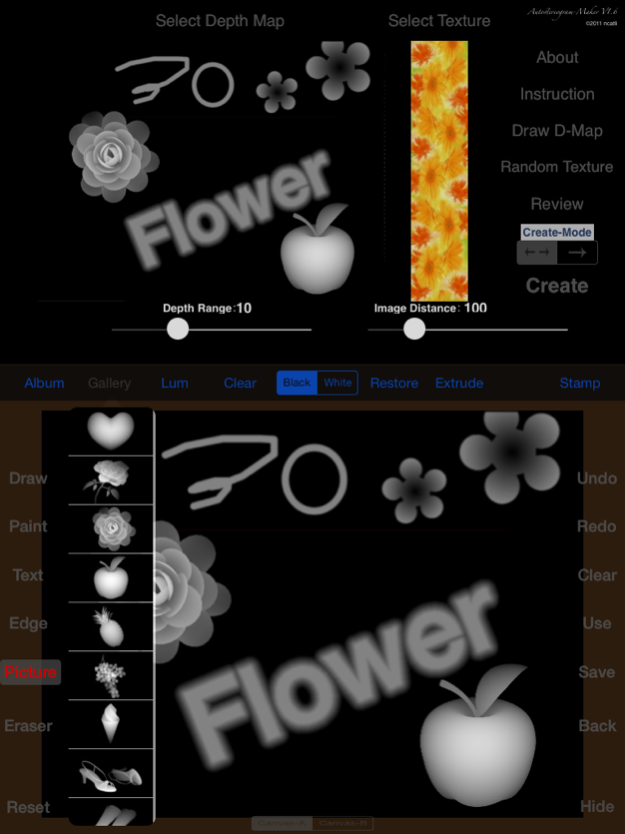

>Special day, sending the most special blessing to the most special person.
>What the most wanted to say are hidden in the stereogram only you two can read.
>Special day, sending the most special blessing to the most special person.
>What the most wanted to say are hidden in the stereogram only you two can read, for a big surprise.
>The contents you most wanted somebody to see, can be turned into a magical stereogram by Autostereogram-Maker, and can be saved in your album or send to somebody.
>Pay attention, at first glance, you just can't see anything in stereogram, needs reading intently, through a special viewing method, it immediately become into a three-dimensional window that you have put into a various kinds of goods, try it,:)
A practical method for watching stereogram:
Take the screen brightness down, place a finger or pen in front of the screen.
Observe its reflection in screen, Search its reflection around.
After a while you should be able to see the three-dimensional image.
Tips:
1. When you create a stereogram contains large amounts of text, you should try to reduce "Depth Range" and "Image distance",there should not contain too many characters in the frame width of watching, otherwise it will lead to reading difficulties.
2. You should select the texture its content is complex and rich color changes, the random-dot texture generated by software can guarantee good imaging effect.
3. The height of texture determines the fine of image and the size of stereogram, also determines the creating time. If the texture height more than 1080 pixels, it will be adjusted to 1080 pixels in creating.
4. A pattern with a transition edge will form a better imaging effect.
5. If the midline position of the imaging is not good, you can try to choose the second Create-Mode.
Aug 15, 2015
Version 1.63
This app has been updated by Apple to display the Apple Watch app icon.
Version 1.63:
1.Some compatibility problems are fixed for IOS 7 and IOS 8.
2.In order to avoid software crash due to the creation of large images, the memory management method is modified.
Version 1.62:
Some compatibility problems are fixed for IOS6.
Version 1.61:
1. Add a instruction.
2. Add 16 new texture built in, it can be switched through sliding the texture from four direction.
3. Add 40 built-in depth-maps in the gallery of "Draw D-Map" function.
4. Add 125 built-in icons in the "Arrange imaging icon" function.
5. Fixed some problems in early version.
About Autostereogram-Maker
The company that develops Autostereogram-Maker is 志强 李. The latest version released by its developer is 1.63.
To install Autostereogram-Maker on your iOS device, just click the green Continue To App button above to start the installation process. The app is listed on our website since 2015-08-15 and was downloaded 0 times. We have already checked if the download link is safe, however for your own protection we recommend that you scan the downloaded app with your antivirus. Your antivirus may detect the Autostereogram-Maker as malware if the download link is broken.
How to install Autostereogram-Maker on your iOS device:
- Click on the Continue To App button on our website. This will redirect you to the App Store.
- Once the Autostereogram-Maker is shown in the iTunes listing of your iOS device, you can start its download and installation. Tap on the GET button to the right of the app to start downloading it.
- If you are not logged-in the iOS appstore app, you'll be prompted for your your Apple ID and/or password.
- After Autostereogram-Maker is downloaded, you'll see an INSTALL button to the right. Tap on it to start the actual installation of the iOS app.
- Once installation is finished you can tap on the OPEN button to start it. Its icon will also be added to your device home screen.
Program Details
System requirements
Download information
Pricing
Version History
version 1.63
posted on 2015-08-15
Aug 15, 2015 Version 1.63
This app has been updated by Apple to display the Apple Watch app icon.
Version 1.63:
1.Some compatibility problems are fixed for IOS 7 and IOS 8.
2.In order to avoid software crash due to the creation of large images, the memory management method is modified.
Version 1.62:
Some compatibility problems are fixed for IOS6.
Version 1.61:
1. Add a instruction.
2. Add 16 new texture built in, it can be switched through sliding the texture from four direction.
3. Add 40 built-in depth-maps in the gallery of "Draw D-Map" function.
4. Add 125 built-in icons in the "Arrange imaging icon" function.
5. Fixed some problems in early version.
version 1.63
posted on 2015-08-15
15 Aug 2015 Version 1.63
This app has been updated by Apple to use the latest Apple signing certificate.
Version 1.63:
1.Some compatibility problems are fixed for IOS 7 and IOS 8.
2.In order to avoid software crash due to the creation of large images, the memory management method is modified.
Version 1.62:
Some compatibility problems are fixed for IOS6.
Version 1.61:
1. Add a instruction.
2. Add 16 new texture built in, it can be switched through sliding the texture from four direction.
3. Add 40 built-in depth-maps in the gallery of "Draw D-Map" function.
4. Add 125 built-in icons in the "Arrange imaging icon" function.
5. Fixed some problems in early version.
version 1.63
posted on 2015-08-15
Aug 15, 2015 Version 1.63
This app has been updated by Apple to use the latest Apple signing certificate.
Version 1.63:
1.Some compatibility problems are fixed for IOS 7 and IOS 8.
2.In order to avoid software crash due to the creation of large images, the memory management method is modified.
Version 1.62:
Some compatibility problems are fixed for IOS6.
Version 1.61:
1. Add a instruction.
2. Add 16 new texture built in, it can be switched through sliding the texture from four direction.
3. Add 40 built-in depth-maps in the gallery of "Draw D-Map" function.
4. Add 125 built-in icons in the "Arrange imaging icon" function.
5. Fixed some problems in early version.
version 1.63
posted on 2015-08-15
Aug 15, 2015 Version 1.63
Version 1.63:
1.Some compatibility problems are fixed for IOS 7 and IOS 8.
2.In order to avoid software crash due to the creation of large images, the memory management method is modified.
Version 1.62:
Some compatibility problems are fixed for IOS6.
Version 1.61:
1. Add a instruction.
2. Add 16 new texture built in, it can be switched through sliding the texture from four direction.
3. Add 40 built-in depth-maps in the gallery of "Draw D-Map" function.
4. Add 125 built-in icons in the "Arrange imaging icon" function.
5. Fixed some problems in early version.
version 1.63
posted on 2011-09-30
version 1.63
posted on 1970-01-01
2015年8月15日 Version 1.63
Version 1.63:
1.Some compatibility problems are fixed for IOS 7 and IOS 8.
2.In order to avoid software crash due to the creation of large images, the memory management method is modified.
Version 1.62:
Some compatibility problems are fixed for IOS6.
Version 1.61:
1. Add a instruction.
2. Add 16 new texture built in, it can be switched through sliding the texture from four direction.
3. Add 40 built-in depth-maps in the gallery of "Draw D-Map" function.
4. Add 125 built-in icons in the "Arrange imaging icon" function.
5. Fixed some problems in early version.
version 1.63
posted on 1970-01-01
2015年8月15日 Version 1.63
This app has been updated by Apple to use the latest Apple signing certificate.
Version 1.63:
1.Some compatibility problems are fixed for IOS 7 and IOS 8.
2.In order to avoid software crash due to the creation of large images, the memory management method is modified.
Version 1.62:
Some compatibility problems are fixed for IOS6.
Version 1.61:
1. Add a instruction.
2. Add 16 new texture built in, it can be switched through sliding the texture from four direction.
3. Add 40 built-in depth-maps in the gallery of "Draw D-Map" function.
4. Add 125 built-in icons in the "Arrange imaging icon" function.
5. Fixed some problems in early version.
version 1.63
posted on 1970-01-01
15 de ago. de 2015 Version 1.63
This app has been updated by Apple to use the latest Apple signing certificate.
Version 1.63:
1.Some compatibility problems are fixed for IOS 7 and IOS 8.
2.In order to avoid software crash due to the creation of large images, the memory management method is modified.
Version 1.62:
Some compatibility problems are fixed for IOS6.
Version 1.61:
1. Add a instruction.
2. Add 16 new texture built in, it can be switched through sliding the texture from four direction.
3. Add 40 built-in depth-maps in the gallery of "Draw D-Map" function.
4. Add 125 built-in icons in the "Arrange imaging icon" function.
5. Fixed some problems in early version.
Disclaimer
Official App Store Link
We do not host Autostereogram-Maker on our servers. We did not scan it for viruses, adware, spyware or other type of malware. This app is hosted by Apple and passed their terms and conditions to be listed there. We recommend caution when installing it.
The App Store link for Autostereogram-Maker is provided to you by apps112.com without any warranties, representations or guarantees of any kind, so access it at your own risk.
If you have questions regarding this particular app contact the publisher directly. For questions about the functionalities of apps112.com contact us.
